How to Verify Your Google Business Profile in Sri Lanka and How an Agency Can Help
Need Google Business Profile verification help? See what to prepare, which methods Google may offer and how to respond if a review needs more information.
You created a Google Business Profile. Google now asks you to verify it. What should you prepare, and what can an agency handle?
Verification helps Google confirm you represent the business. A listing may appear before you control it.
Need Google Business Profile verification help? You can complete the steps yourself. FMB can guide you.
1. Prepare Before Requesting Verification
Check that your profile matches how your business operates.
| What to prepare | What to check |
|---|---|
| Google account | Access the linked account; it can use any email address. |
| Authority to act | You have the owner’s written or digital permission. |
| Business details | Details match actual operations. |
| Phone or email | Access the offered contact method. |
| Supporting information | Use current, genuine materials. |
Match your profile name to your signage.
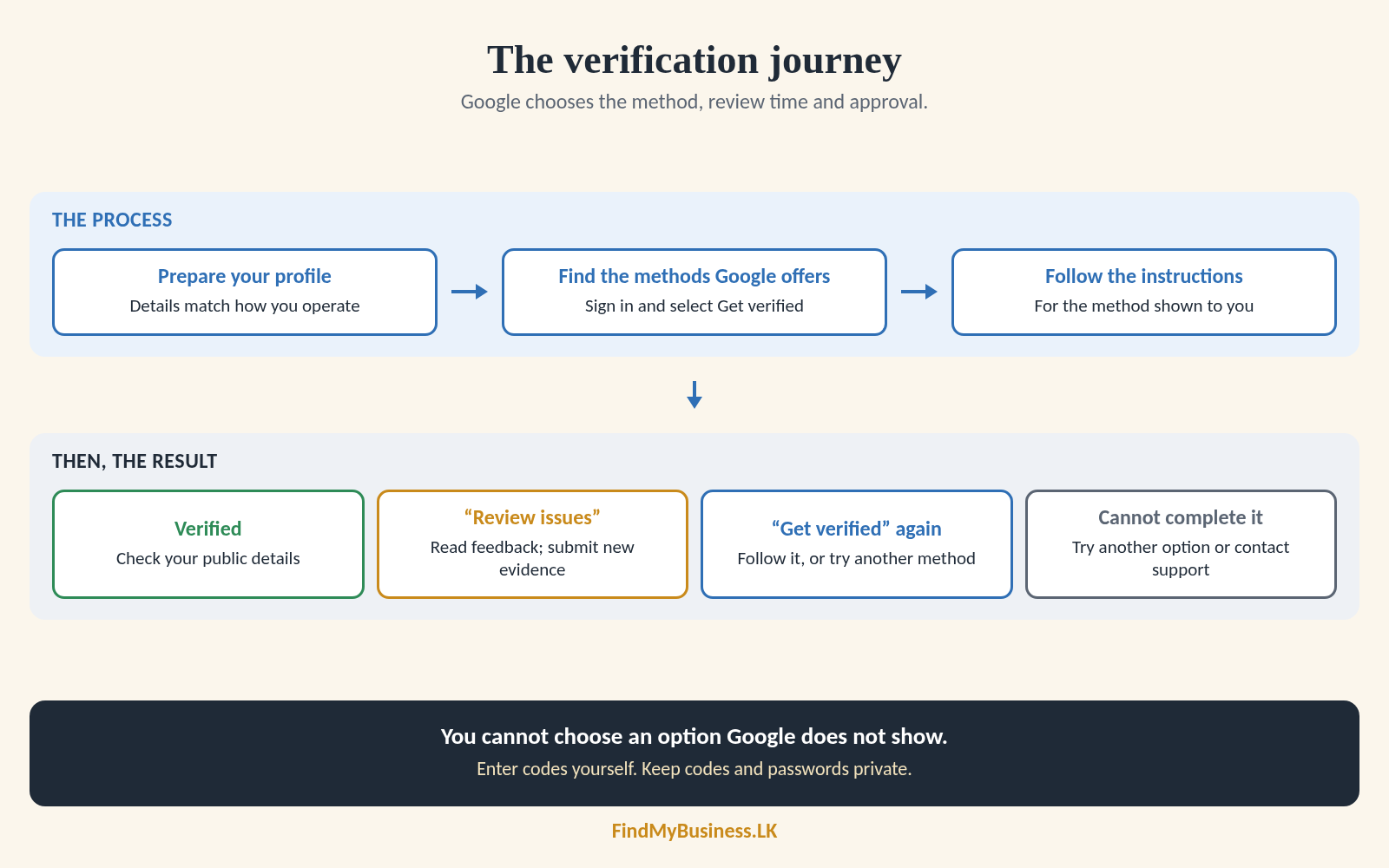
2. Find the Methods Google Offers
Sign in to the linked Google Account. Search your business name and town, or “my business”, then select Get verified.
Google chooses methods based on your business type, public information, region and hours. More than one method may be required. You cannot choose an option Google does not show.
3. Follow the Instructions for Your Method
| Method, if offered | What to do |
|---|---|
| Phone or text | Enter the code sent to the listed business number. |
| Follow the message sent to the email shown. | |
| Postcard | Check the address, request the code and enter it when it arrives. |
| Video recording | Record and upload a video as your profile instructs. |
| Live video call | Join at your business and show what Google requests. |
A verification video for review is different from a live call. Our guide to Google Business Profile videos and photos covers preparation.
If You Are Waiting for a Postcard
Google says most codes arrive within 14 days. Delivery in Sri Lanka may vary.
While waiting, do not change your business name, address or category, or request another code. Either action invalidates the code already in the mail. Codes expire after 30 days.
Enter the code yourself. Keep codes and passwords private; do not share them with FMB or anyone managing your profile.
4. Check the Result and Respond to Requests
Google may take up to five working days to review your completed verification. Some cases take longer. This excludes preparation and postal delivery.
| What happens | Your next step |
|---|---|
| Verification succeeds | Check that the public business details are accurate. |
| “Review issues” appears | Read Google’s feedback and submit new evidence if requested. |
| “Get verified” appears again | Follow the instructions or try another available method. |
| You cannot complete the method | Try another option or contact Google Business Profile support. |
| Profile is suspended or disabled | Follow the separate restriction or appeal process. |
How Can FindMyBusiness.LK Help?
FindMyBusiness.LK (FMB) uses Google’s agency tools to prepare your profile and guide you through verification. With your written or digital authorisation, we check for missing details, organise relevant information and explain Google’s requests.
You may still need to access your phone or email, or demonstrate your business. Google decides the method, review time and approval. Agency access gives no priority.
FMB’s One-Off Setup Packages
| Price | What the package includes |
|---|---|
| Base package · LKR 5,000 | Google Business Profile setup and verification assistance, plus a digital review QR file you can print. |
| LKR 6,500 | Everything in the Base package, plus a custom printed review QR sticker couriered to your shop. |
| LKR 7,500 | Everything in the LKR 6,500 package, with the sticker mounted on a durable A4 L-shaped stand for your counter or table. |
| LKR 10,000 | Everything in the LKR 7,500 package, including the A4 stand, plus a WhatsApp chat link added to your Google Business Profile, where available. |
Google Business Profile is free. FMB charges for its setup work and package materials. Google determines verification requirements and approval.
You remain the primary owner. We receive agency access only after your written or digital authorisation. Enter your own codes; never share your password or code.
Need Help with Verification?
Send us your business name, town or village, and the verification option or message Google displays. Do not send passwords or codes.
WhatsApp: +94 77 390 9362
Call: +94 77 390 9362
Website: FindMyBusiness.LK